NinjaTrader 8 · Add-on · Market Replay downloads
ReplayDownloader
Every replay day you are missing, in one queue.
ReplayDownloader adds a single window to the NinjaTrader Control Center that fills your Market Replay folder across any date range and any number of contracts, then tells you exactly what it fetched, what was already there, and what the server no longer holds.
One-time purchase · Free updates · 3-day free trial, no card · Needs a NinjaTrader 8 account
What it does
Set a range. Walk away.
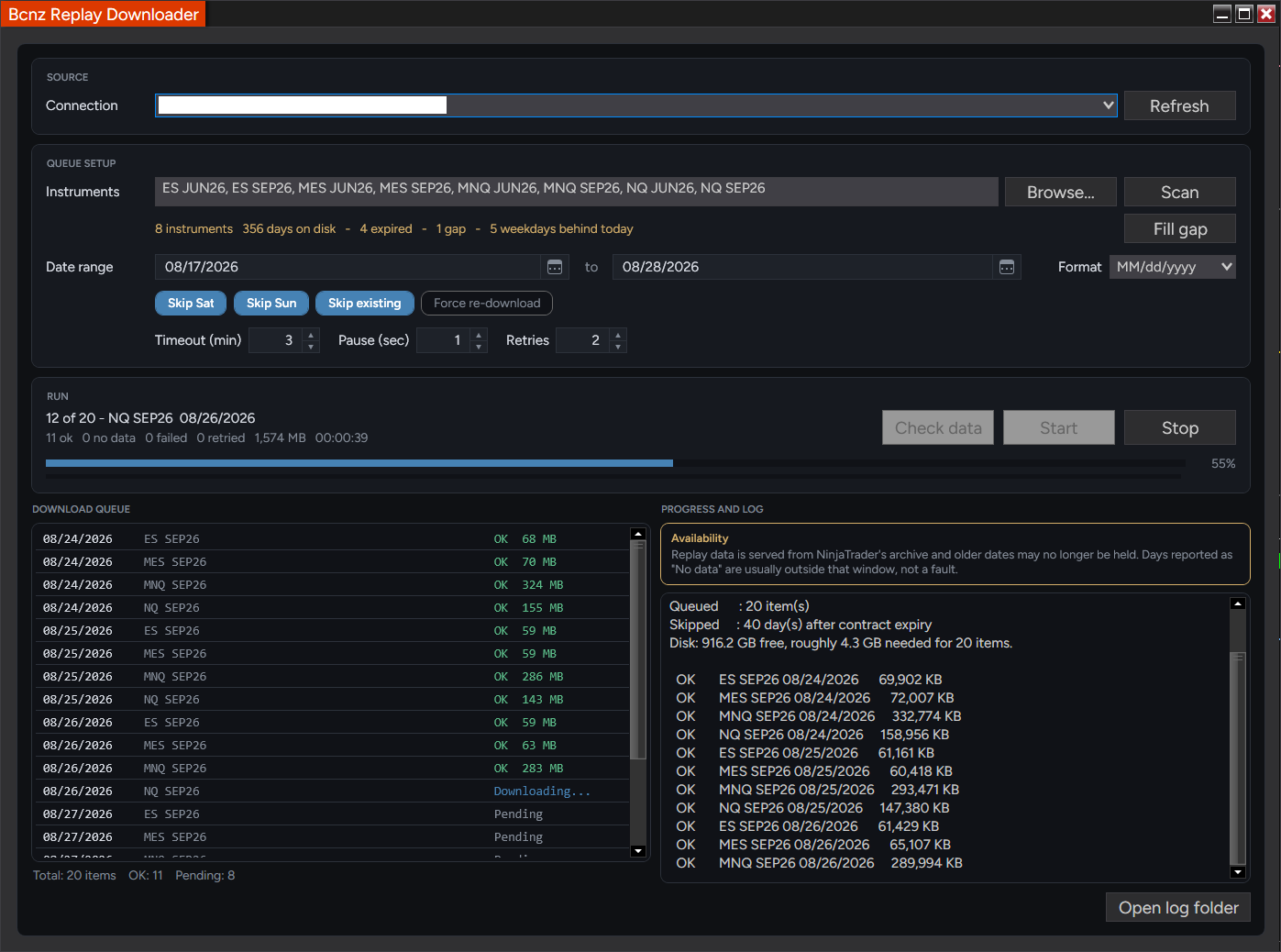
NinjaTrader downloads Market Replay one instrument and one day at a time. This queues the whole span — every contract, every session — and works through it while you do something else.
A range, not a day
Pick a start and a stop date and as many contracts as you like. The queue is ordered by date then instrument, so it fills the way you think about a calendar. Saturdays and Sundays are skipped by default, and days past a futures contract’s expiry are dropped rather than requested as guaranteed empty traffic.
It knows what you already have
Skip existing is on by default: anything already in your replay folder is marked on disk and left alone. A second run over the same range costs nothing, and an interrupted run is resumed by pressing Start again.
Check before you commit
Check data builds the entire queue and reports it without downloading anything — how many items would be fetched, how many are already on disk, how many fall outside the likely retention window, and a rough gigabyte estimate.
Built to be left alone
Timeout, pause between requests and retry count are all yours, with a backoff that widens on each attempt. A transfer that fails has its partial file deleted rather than left behind looking complete. If the connection drops mid-batch it stops instead of stacking up identical failures.
Choosing instruments
Pick contracts. Do not type them.
Browse opens a searchable list of every instrument the platform knows about. Each contract carries what you already hold for it, so the gap is visible before you queue anything.
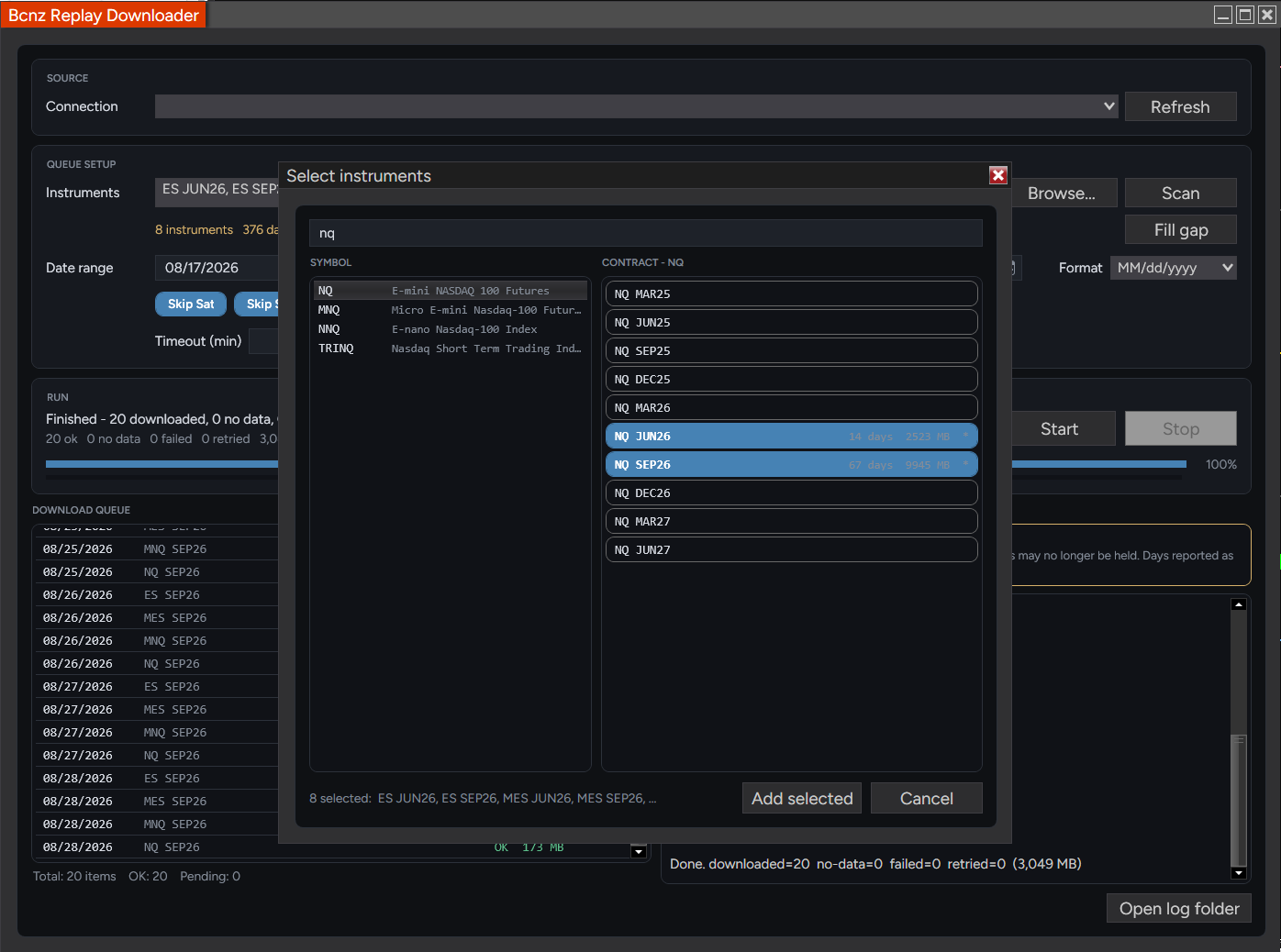
What the picker hands back is what the folder is called. Selections come back as resolved instrument names rather than strings you typed, so the queue always matches the replay folder naming exactly. Contracts stored under an older name are recognized too. You can still type names by hand, comma separated, if you prefer.
Coverage
See the holes before you fill them.
A line under the instrument box summarizes every contract you have selected. Scan writes the detail into the log, date by date.
| Days on disk | Sessions already downloaded, and the span they cover |
| Gaps | Missing weekdays inside the span you already cover |
| Behind today | Weekdays between your newest file and yesterday |
| Expired | Measured against the contract’s expiry, not today’s calendar |
| Possible partials | Session files under 1 MB — likely truncated, worth repairing |
| Empty sessions | Files under 8 KB — a holiday or early close, not a fault |
Fill gap sets the range for you. One press spans from your oldest file on disk through yesterday and leaves Skip existing on, so the run touches only the days you actually lack. An expired contract is measured to its expiry instead, because counting it against today would report a deficit that can never be filled.
Truncated files get called out. A half-written session is the one failure that hides — it exists, so the skip-existing check passes over it forever. Suspect files are listed by date and size before a run starts, and ticking Force re-download over those dates repairs them.
Long runs
What happens while you are not watching.
| Disk check | Estimates the batch and compares it with free space before starting |
| Retries | Configurable, with a backoff that widens on each attempt |
| Partial cleanup | A file this run created but failed to finish is removed |
| Connection loss | The batch stops rather than failing every remaining item |
| Playback open | Warns when an active Playback connection may hold files open |
| Stop | Cancels cleanly — unrun items are marked canceled, not failed |
| Log | Written to your NinjaTrader 8 folder, with a button that opens it |
| Settings | Instruments, timeouts, chips and window size are remembered |
The queue and the log say the same thing two ways. The queue is one row per date and contract with a status and a size; the log is the running narrative, ending in totals — downloaded, no data, failed, retried, and megabytes moved. It follows the newest line only while you are already scrolled to the bottom, so reading back through it is not a fight.
Honest limits
What it cannot do.
This moves data that already exists. It does not create any.
It cannot download what the server no longer holds. Market Replay is served from NinjaTrader’s archive, and older dates fall out of it. Days that come back No data are usually outside that window rather than broken, which the window says on its face; anything queued from more than 90 days ago is flagged before the run starts.
It needs a connected data feed. The add-on borrows the historical data client your platform is already using, so a feed has to be connected and entitled to Market Replay for your instruments. Playback and Simulator do not qualify — those connections serve data rather than fetch it. It never connects, disconnects or disposes the client either — the platform owns it, and an add-on that closed it would break the rest of your session.
It is not an indicator. Nothing is drawn on any chart and nothing is added to your indicator list. It is one window under Control Center → Tools, and files land in NinjaTrader’s own replay folder in NinjaTrader’s own format — there is no separate store to maintain and nothing to undo if you remove it.
Sizes are large and the estimate is rough. A single index-future session runs from tens of megabytes to a few hundred. The disk check assumes roughly 220 MB per item, which is deliberately generous — treat it as a guard against filling the drive, not as a forecast.
How you get access
It runs right away. Read this anyway.
ReplayDownloader is licensed through the NinjaTrader Ecosystem, which ties access to your NinjaTrader account rather than to a key you paste in. Two things follow from that.
Try it free first. The free trial download runs for 3 days on your NinjaTrader account, with no payment details. When it ends, ReplayDownloader stops working until you buy it — and buying keeps the copy you already installed. Each NinjaTrader account gets one trial; if you buy without trying it first, the same 3-day trial starts the moment you import it.
Give us the email on your NinjaTrader account. Checkout asks for it as a required field. It is the address your NinjaTrader 8 platform is registered to — not necessarily the one you pay with. If you are not sure which it is, open NinjaTrader and check Help → About before you buy.
Permanent access follows within one business day. Registration against the vendor license is done by hand, which is why it is not instant — but on the trial you can use it in the meantime. You will get an email once it is done.
Wrong email, or no email? If you entered an address that turns out not to be your NinjaTrader account, reply to your Gumroad receipt with the correct one and we will move it. Nothing is lost and there is no charge to change it.
Specification
Built for NinjaTrader 8.
| Platform | NinjaTrader 8 — version 8.1.5.0 or later |
| Type | Add-On — Control Center → Tools → Omen Replay Downloader |
| Language | C# / NinjaScript |
| Interface | WPF window, themed to match the platform |
| Requires | A connected feed entitled to Market Replay — not Playback or Simulator |
| Instruments | Anything NinjaTrader lists — futures contracts are expiry aware |
| Writes to | NinjaTrader’s own replay folder, in its own format |
| Network | No third-party calls — requests go through the platform’s client |
| Reads | Instrument names and replay file sizes — no account or order data |
| Charts | None — nothing is drawn and no indicator is installed |
| Log | BcnzReplayDownloader.log, in your NinjaTrader 8 folder |
| Settings | Remembered between sessions |
| Delivery | .zip — imports straight into NinjaTrader 8 |
| License | NinjaTrader Ecosystem — granted to your NinjaTrader account email |
| Activation | Automatic 3-day trial; permanent within one business day |
| Price | $29 one-time |

Our recommended trading platform
Get set up on NinjaTrader.
NinjaTrader® is our #1 recommended trading software platform preferred by traders worldwide including our clients.
Download NinjaTrader & receive immediate FREE access to:
- Real-time futures data
- Advanced charting
- Trade simulator
- Strategy development and backtesting
NinjaTrader's award-winning trading platform is consistently voted an industry leader by the trading community. Featuring 1000s of Apps & Add-Ons for unlimited customization, NinjaTrader is used by over 500,000 traders for advanced market analysis, professional charting and fast order execution.
For new traders, start preparing for the live markets with a free trading simulator featuring real-time market data.
Get Started for FREE!Affiliate disclosure. The NinjaTrader links here are affiliate links: if you open or fund an account through them, we may earn a commission, at no additional cost to you.
NinjaTrader® is a registered trademark of NinjaTrader Group, LLC. No NinjaTrader company has any affiliation with the owner, developer, or provider of the products or services described herein, or any interest, ownership or otherwise, in any such product or service, or endorses, recommends or approves any such product or service.
Nature of the product. ReplayDownloader is a data utility for NinjaTrader 8 — it queues and retrieves Market Replay files that your data provider already makes available, using the platform’s own connection. It is not a trading system, not a signal service and not an indicator. It generates no signals, places no orders, reads no account or order data, draws nothing on any chart, and makes no connection of its own to any third party. Every decision, entry and exit remains yours. Nothing on this page is financial advice, a recommendation to trade, or an offer to buy or sell any instrument.
 Ask